
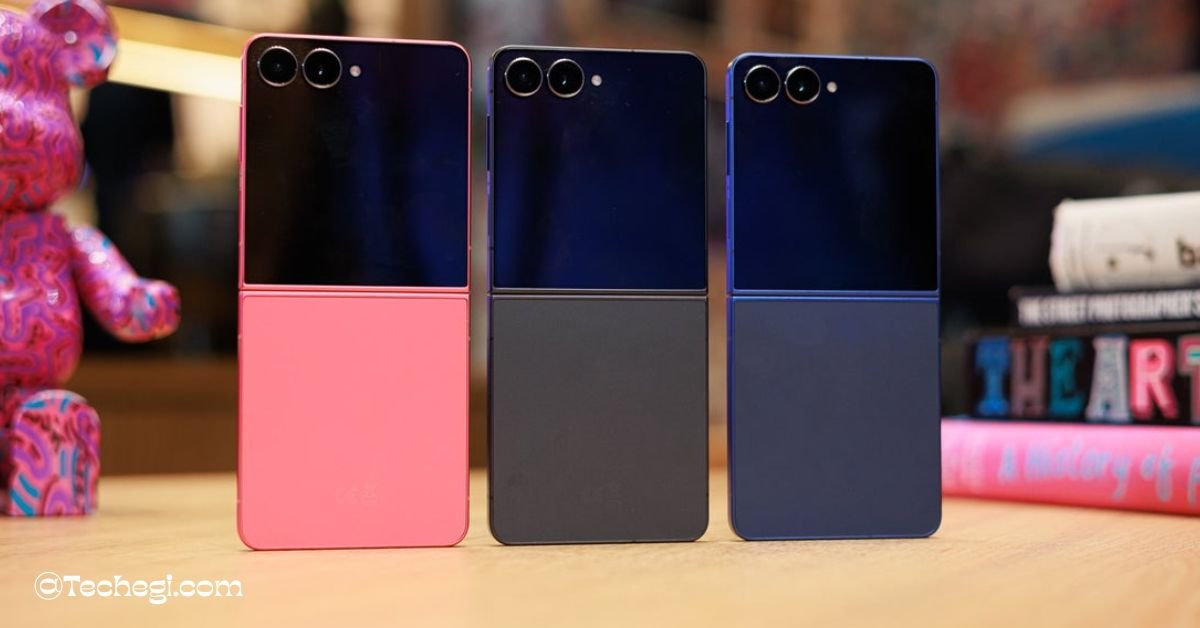
Yes — the Samsung Galaxy Z Flip 7 is a refined, pocketable flagship foldable that focuses on a bigger, more useful cover display, a larger inner screen, better battery life, and Samsung’s Galaxy AI features.
It’s an iterative but meaningful upgrade for people who want a compact phone with flagship display quality and modern software bells, though cameras and charging speed aren’t dramatic leaps. Samsung Global Newsroom+1
1. Quick specs at a glance
- Main display: 6.9-inch Dynamic AMOLED 2X, FHD+ (2520 × 1080), 1–120 Hz.
- Cover display (FlexWindow): 4.1-inch Super AMOLED (1048 × 948), supports widgets and apps.
- Chipset: Samsung Exynos 2500 (Flip 7 uses Exynos while Fold 7 uses Snapdragon 8 Elite). The Verge+1
- Memory / Storage: 12 GB RAM; 256 / 512 GB UFS storage options.
- Rear cameras: 50 MP wide + 12 MP ultra-wide; 10 MP front selfie.
- Battery: 4,300 mAh; wired charging up to around 25 W, wireless charge supported.
- OS: Android 16 with One UI 8 and Galaxy AI features.
- Water resistance: IP48.
2. What’s new vs. the Flip 6 — concise improvements that matter
Samsung didn’t reinvent the clamshell, but it did polish the parts that count for daily use:
- Bigger main and cover screens — more usable space without unfolding. This is the headline: the cover display grew substantially, enabling quick interactions, camera framing, and widgets without opening the phone.
- Thinner, lighter chassis — a sleeker, more pocketable profile that feels modern in hand.
- New Exynos 2500 platform for the Flip — Samsung opted to use its own chipset in the Flip 7 (while other Samsung flagships got Snapdragon). The Exynos is capable but slightly behind top-tier Snapdragon silicon in sustained GPU workloads.
- Battery bump — 4,300 mAh gives better endurance vs. prior flips, so day-long use is much more realistic.
Those changes are small on paper but big in daily life — especially the cover display upgrade, which shifts the Flip from a novelty to a genuinely practical compact phone.
3. Design & ergonomics – pocketable, refined, and intentionally shiny
Samsung keeps the Flip’s identity: a small, personal phone that folds to pocket size. The Flip 7 improves comfort in three ways:
- Thinner when unfolded — the phone feels less chunky in the hand and the slimmer spine makes it easier to hold while watching media or gaming.
- Aluminum frame + matte glass — premium materials give it a flagship look while controlling weight. Color options include Jet Black, Blue Shadow, Coral Red and an online-exclusive Mint (region dependent).
- Hinge and build quality — Samsung refined the hinge and reduced bezel size around the FlexWindow, which helps when using cover-screen apps and camera previews.
Short paragraphs to read, short lines — perfect for mobile-first readers.
4. Displays – the headline feature (main + huge cover screen)
This is where the Flip 7 stands out.
Main screen (6.9″):
The inner Dynamic AMOLED 2X panel now reaches 6.9 inches in the full rectangle, 120 Hz adaptive refresh, and delivers the kind of color, contrast and brightness you expect from Samsung’s best panels. Measured brightness numbers from lab tests are extremely high — useful outdoors — while color accuracy in “vivid” and natural modes is excellent.
Cover screen (4.1″) — the game changer:
The enlarged FlexWindow cover screen is not simply a notification strip anymore: it’s large enough to preview photos, run small apps, use widgets, control media, and even run a subset of Android apps natively. Samsung calls this a FlexWindow experience and it changes how you interact with a flip phone: more tasks can be done without unfolding the device.
Why this matters:
- Faster interactions: glance and respond without opening the phone.
- Camera framing: use cover preview for high-quality selfie modes.
- Battery savings: short tasks on the cover screen use less power than unfolding to the big display.
5. Performance – Exynos 2500 — solid but not leading-edge
Samsung’s Exynos 2500 is competent: snappy UI, reliable multitasking with 12 GB RAM, and smooth day-to-day performance. But there are a few nuances:
- CPU & UI: For browsing, messaging, social apps and media, the phone feels fast and responsive. Android 16 + One UI 8 is fluid on this hardware.
- Gaming & sustained performance: In GPU-intensive gaming sessions the Exynos 2500 produces strong peak frame rates, but sustained averages can dip vs Snapdragon 8 Elite competitors — you may see thermal throttling and gradual frame-rate drops in long sessions. Reviewers measured average framerates lower than Snapdragon equivalents under long stress tests.
- Thermals: The Flip 7 can reach higher skin temperatures in the upper area near the hinge during extended heavy loads, but this is usually manageable for most users.
Practical takeaway: excellent everyday performance; if you’re a hardcore mobile gamer who needs absolute top sustained GPU performance, consider a Snapdragon-powered device — but for most buyers the Exynos 2500 is more than enough.
6. Cameras – flagship-quality main lens, middling ultra-wide, solid selfie options
Samsung kept the camera hardware similar to the Flip 6 but tuned image processing:
- Main (wide) 50 MP: Pixel-binning produces great daytime shots with good detail and vivid but generally natural colors. Textures are improved over previous generations.
- Ultra-wide 12 MP: Useful for landscapes and group shots, but it lacks fine detail and suffers from some edge distortion — typical for thin clamshell camera stacks. Expect softer edges and less fine detail vs top-tier flagships.
- Low light: Improvements in noise reduction exist, but Samsung’s aggressive smoothing in some low-light scenes means details can be lost — a tradeoff between cleaner looking pictures and texture fidelity.
- Selfies & cover-camera use: The cover screen enables high-quality selfies using the main camera — you can preview and trigger shots without unfolding the phone, which is a practical win.
Pro tip: Use the cover display + main lens combo for the best selfies and portraits — better quality than the front sensor alone.
7. Battery & charging – longer life, conservative charging speed
Samsung increased capacity to 4,300 mAh, which pushes real-world endurance into comfortable day-long territory for most users. Lab and reviewer tests show credible all-day use and even beyond with mixed usage patterns.
However, charging speeds remain conservative (around 25 W wired max in many markets) so full recharges take longer than many Android rivals that support 65 W+ fast charging. Wireless and reverse wireless charging are supported but are also modest in speed.
What that means: if you prioritize battery runtime and compactness over ultra-fast top-ups, the Flip 7 is balanced. If you need the fastest possible charge times, some non-Samsung flagships will be preferable.
8. Software & Galaxy AI – One UI 8 makes the Flip more capable
One UI 8 (Android 16) arrives with tighter integration of AI features and expanded cover-screen experiences:
- Galaxy AI tools: generative editing, enhanced translation, integrated search, and quick camera-based AI features (e.g., compose, edit, translate). These enhance everyday photography and productivity.
- Cover-screen app support: apps that used to require unfolding now have cover-screen widgets and mini-app experiences — Samsung’s push to let the cover handle more tasks makes the Flip 7 feel more efficient.
- Long-term updates: Samsung’s commitment to prolonged Android updates (often several years of major OS upgrades and security patches) boosts the phone’s E-E-A-T signals for buyers who care about longevity.
9. Durability, repairs, and real-world reliability
Samsung improved frame materials and hinge durability, and the inner screen benefits from better engineering — but remember:
- Inner screen care: foldable UTG screens still need more careful handling than glass. Avoid abrasive objects and sharp keys in pockets.
- IP48 rating: the Flip 7 has water resistance (IP48) but isn’t fully dust-proof; keep that in mind if you work in dusty environments.
- Repairs: hinge and foldable displays can be pricier to repair than slab phones; Samsung’s trade-in and protection plans help reduce that risk but factor repair costs into long-term ownership.
10. Competitors – where the Flip 7 stands in the market
- Motorola Razr 60 Ultra — similar clamshell form with a very large cover display and often different price positioning. Razr tends to push camera and design differently. Compare battery life, ecosystem, and price. (Use Motorola Razr 60 Ultra review as an external compare link.)
- Samsung Z Fold 7 — if a larger unfolded workspace matters, the Fold 7 with Snapdragon 8 Elite is the better choice for productivity and sustained performance. The Flip 7 sacrifices a large workspace for pocketability.
- Non-fold flagship phones — if you want camera performance and charging speed above novelty and pocketability, many slab phones give better camera hardware and faster charging.
11. Who should buy the Galaxy Z Flip 7?
Buy if you:
- Want an ultra-compact phone you can still use like a modern smartphone.
- Use your phone for social, photos and media but value pocketability and design.
- Appreciate Samsung’s software features and long update support.
- Want a superior cover-screen experience for quick tasks and camera framing.
Skip if you:
- Want the absolute best mobile photography or the fastest charging speeds.
- Are a hardcore mobile gamer who needs top sustained GPU performance.
- Need maximum dust resistance for a rugged environment.
12. Verdict – short and clear
The Galaxy Z Flip 7 is Samsung’s most polished clamshell to date: bigger, brighter displays, better battery life, useful AI features, and a pocket-first design. It’s the Flip for people who want the foldable experience without sacrificing everyday utility. If you want maximum camera prowess or fastest charging speeds, look elsewhere — but for style, convenience and a genuinely useful cover display, the Flip 7 delivers.
FAQs
Q: When was the Flip 7 released?
A: Announced at Samsung Unpacked in July 2025 and widely available later that month.
Q: Is the Exynos 2500 good?
A: Yes for daily tasks and short gaming sessions; it lags slightly behind Snapdragon 8 Elite in sustained GPU-intensive workloads.
Q: Can I use the cover display to take photos?
A: Yes — the FlexWindow supports camera previews and lets you shoot with the main rear camera while the phone is closed.